
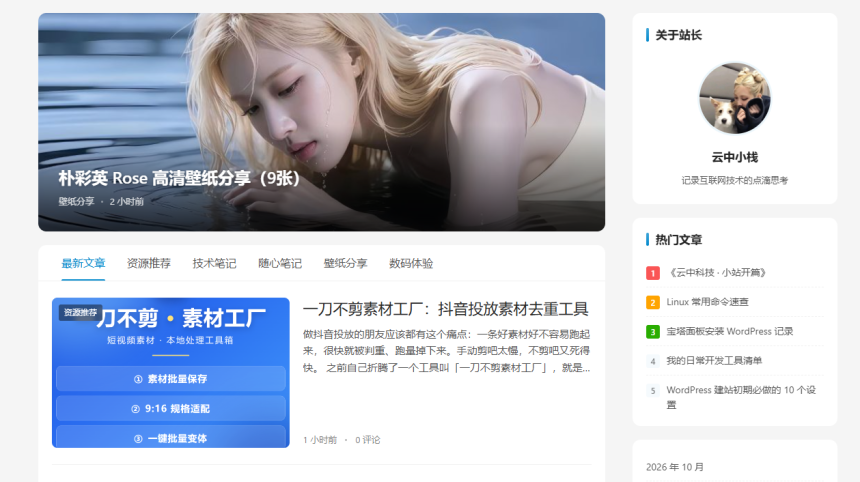
最近自己折腾了一个 WordPress 主题叫 NewsFlow,专门给个人博客和资讯站用的。用了一段时间觉得挺好用,分享给大家。
主题特色
- 首页轮播:支持按分类取文章,也可以自选文章 ID 固定推荐
- 分类 Tab 文章流:首页 Tab 切换浏览不同分类,AJAX 加载不跳转
- 夜间模式:一键切换深色/浅色,自动记住选择
- 移动端适配:手机端底部导航、搜索、分类、回到顶一应俱全
- 图片灯箱:文章内图片点击放大,支持左右切换下一张
- 主题设置面板:不用写代码,后台可视化设置颜色、Logo、社交链接
- 社交链接:微博、微信、QQ、邮箱,页脚圆形图标展示
- 轻量快速:没有臃肿的页面编辑器,纯代码输出,加载快
更新日志
v1.0(2026-10-13)
- 初始版本发布
- 首页轮播、分类 Tab、夜间模式、移动端底部导航
- 后台主题设置面板、社交链接输出
v1.1(2026-10-14)
- 新增图片灯箱功能(代码见下方)
- 优化 SEO 标题模板:文章页自动显示「文章标题 – 站点名」
图片灯箱实现方法
不需要装插件,直接把以下代码加到主题的 footer.php 末尾(</body> 之前)即可。
<!-- 图片灯箱 -->
<div id="nf-lightbox" style="display:none;position:fixed;inset:0;z-index:99999;background:rgba(0,0,0,0.9);align-items:center;justify-content:center;flex-direction:column;">
<button class="nf-lb-close" style="position:absolute;top:16px;right:20px;color:#fff;font-size:28px;background:none;border:none;cursor:pointer;z-index:10;line-height:1;">×</button>
<button class="nf-lb-prev" style="position:absolute;left:16px;top:50%;transform:translateY(-50%);color:#fff;font-size:36px;background:rgba(255,255,255,0.1);border:none;width:48px;height:48px;border-radius:50%;cursor:pointer;z-index:10;">‹</button>
<button class="nf-lb-next" style="position:absolute;right:16px;top:50%;transform:translateY(-50%);color:#fff;font-size:36px;background:rgba(255,255,255,0.1);border:none;width:48px;height:48px;border-radius:50%;cursor:pointer;z-index:10;">›</button>
<img class="nf-lb-img" style="max-width:92%;max-height:85vh;object-fit:contain;border-radius:4px;" src="" alt="">
<div class="nf-lb-caption" style="color:rgba(255,255,255,0.7);margin-top:12px;font-size:14px;"></div>
</div>
<script>
(function(){
var lb = document.getElementById('nf-lightbox');
var lbImg = lb.querySelector('.nf-lb-img');
var lbCap = lb.querySelector('.nf-lb-caption');
var currentImgs = [], currentIdx = 0;
function openLb(imgs, idx){currentImgs=imgs;currentIdx=idx;showImg();lb.style.display='flex';document.body.style.overflow='hidden';}
function closeLb(){lb.style.display='none';document.body.style.overflow='';}
function showImg(){var item=currentImgs[currentIdx];lbImg.src=item.href||item.src;lbCap.textContent=(item.alt||'')+' ('+(currentIdx+1)+'/'+currentImgs.length+')';}
lb.querySelector('.nf-lb-close').addEventListener('click',closeLb);
lb.querySelector('.nf-lb-prev').addEventListener('click',function(){if(currentIdx>0){currentIdx--;showImg();}});
lb.querySelector('.nf-lb-next').addEventListener('click',function(){if(currentIdx0){currentIdx--;showImg();}}
if(e.key==='ArrowRight'){if(currentIdx=0)openLb(imgs,idx);
});
})();
</script> 支持点击放大、左右箭头切换、键盘方向键、ESC 关闭,全部原生 JS 零依赖。
SEO 标题模板设置
装了 Yoast SEO 插件后,在 functions.php 末尾加以下代码,让每篇文章标题自动变成「文章标题 – 站点名」:
<?php
// Yoast SEO 标题模板
add_action('init', function() {
  $options = get_option('wpseo_titles');
  if (!is_array($options)) $options = array();
  $options['title-post'] = '%%title%% - %%sitename%%';
  $options['title-page'] = '%%title%% - %%sitename%%';
  $options['title-category'] = '%%term%% - %%sitename%%';
  $options['title-tag'] = '%%term%% - %%sitename%%';
  update_option('wpseo_titles', $options);
});
?>
适合谁用
如果你想要一个简洁的资讯博客主题,不想要那种花里胡哨的拖拽编辑器,这个主题很适合。设置都在后台,改颜色、换 Logo、配轮播文章,全部点几下就搞定。
安装方法
下载 zip 包,在 WordPress 后台「外观 → 主题 → 安装主题 → 上传主题」,选 zip 文件安装启用即可。
下载地址
下载链接我放在网盘了,评论区获取。